 aisma
aisma
Real Aisma edit
One kitchen talk. Three new people.
Example requestreplace the man with the guy from the photos
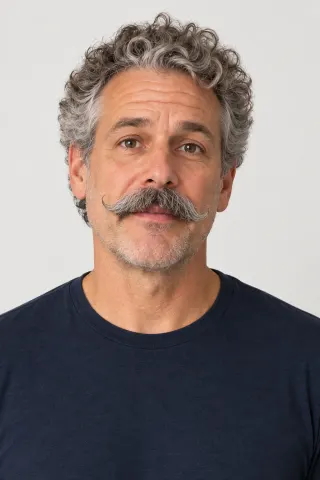
AI BODY SWAP FOR YOUR FOOTAGE
Put the person from your photos in place of the one you filmed: the face, the hair and often the clothes. The gestures, the room, the camera move and your audio stay as they were.
Paid editing · MP4 or MOV · 2–60 seconds · Review credits before generating.
One kitchen talk. Three new people.
Example requestreplace the man with the guy from the photos
THE SHORT ANSWER
Replacing a person in a video swaps someone you filmed for someone else. With Aisma, you bring a 2–60 second clip and photos of the new person and say who they replace. Face and hair come from the photos, the clothes often do too, and the gestures, camera and audio come from your take.
What stays
What changes
What you bring
Your clip + photos of the new person + a request saying who they replace
A SECOND SCENE
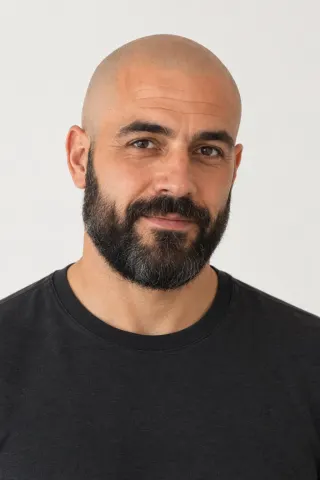
Both cooks came from two portraits each, and the brief asked to keep the apron, the stir and the spoon. Nobody mentioned the shirt: the bald, bearded cook kept the dark olive one, and the woman with the silver bob wears the charcoal T-shirt from her photos.

Bald, bearded, same stir.swap the cook for the man in the photos
Examples marked Previous version were recorded with a previous version of Aisma. Results vary with your clip and request.
WHAT COMES FROM WHERE
Five people replaced the original in two scenes on this page. Here’s where each part of the shot took its look from, and what happened in those edits.
| Part of the shot | Comes from | In the edits on this page |
|---|---|---|
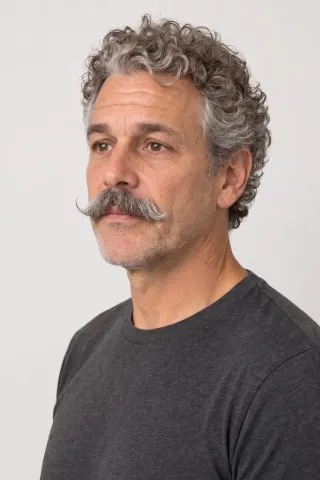
| Face, hair and skin tone | Your photos | All five faces and hairstyles match their portraits, down to the veteran’s gray mustache and the cook’s silver bob |
| Clothes | Often your photos; your clip when the request names them exactly | The newcomer and the silver-bob cook wear the T-shirts from their portraits; the named apron stayed, and the named T-shirt stayed blue |
| Gestures, head turns and timing | Your clip | Each new person makes the original’s hand gestures and stirs the pot at the same moments |
| Setting, light and camera | Your clip | Both kitchens, the window light and the framing match the originals |
Sound comes from your clip as well: Aisma keeps the audio you recorded, so a voice stays the voice you filmed.
To keep the outfit and change the face and hair, name the clothes in your request; the video face swap page has tips for the portraits.
WORD FOR WORD
The players show each request in short form. These are the briefs behind four of the takes, exactly as we sent them, with what changed and what stayed.
The brief
Replace the man with the same person shown in Photos 1 and 2. Keep his bright royal-blue crew-neck T-shirt exactly the same colour as in the video. Preserve his hand gestures, head movement, the kitchen, lighting and camera. Keep the new person's appearance consistent throughout.
What changed
The man became a fictional man about 55, the one in the portraits: gray curls, the gray mustache, his face and skin tone. The T-shirt came out a brighter blue, without its chest pocket.
What stayed
A blue crew-neck T-shirt, the hand gestures, the head movement, the kitchen, the light and the camera.
September 28, 2026 · 10-second clip · 720p · second run. The first run asked to “preserve the blue T-shirt,” and the T-shirt changed color.
See this editThe brief
Replace the man with the woman shown in Photos 1 and 2. Preserve the blue T-shirt, hand gestures, head movement, the kitchen, lighting and camera. Keep the new person's appearance consistent throughout.
What changed
The whole person: a fictional woman about 32, with her own face, long black hair and arms, in the charcoal T-shirt from her portraits, although the brief asked to keep the blue one.
What stayed
The hand gestures, the head movement, the kitchen, the light and the camera.
September 28, 2026 · 10-second clip · 720p · first run, kept as it came out.
See this editThe brief
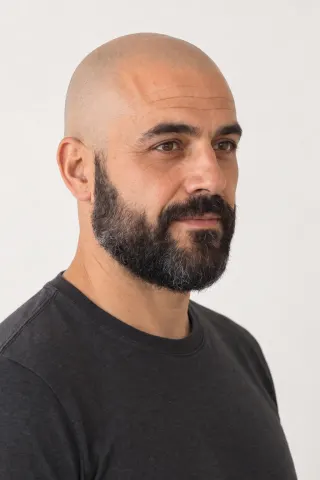
Replace the cook with the same person shown in Photos 1 and 2. Preserve the apron, stirring action, spoon, the kitchen, lighting and camera. Keep the new person's appearance consistent throughout.
What changed
The cook became a fictional bald, bearded man about 45, the one in the portraits: his face, head and beard.
What stayed
The dark olive shirt nobody mentioned (his portraits show a black T-shirt), the beige apron, the stir, the wooden spoon, the glance at the lens, the kitchen and the camera.
Previous version · September 13, 2026 · 10-second clip · 1080p · first run.
See this editThe brief
Replace the cook with the woman shown in Photos 1 and 2. Preserve the apron, stirring action, spoon, the kitchen, lighting and camera. Keep the new person's appearance consistent throughout.
What changed
The cook became a fictional woman about 60 with a silver bob, and the shirt nobody mentioned became the charcoal T-shirt from her portraits.
What stayed
The beige apron, the stir, the wooden spoon, the glance at the lens, the kitchen and the camera.
Previous version · September 13, 2026 · 10-second clip · 1080p · first run.
See this editWRITING THE REQUEST
Point to the person the way you would to a friend, by clothing or position, then to the photos.
Replace the man in the blue T-shirt with the woman in Photos 1 and 2.
Name the shade and the neckline. A vague keep can lose to the clothes in the photos, as “preserve the blue T-shirt” did in our first kitchen runs.
Keep his bright royal-blue crew-neck T-shirt.
Props and layers belong in the same sentence. Both cooks kept the apron and the wooden spoon, which the brief listed.
Keep the apron, the stir and the wooden spoon.
HOW IT WORKS
MP4 or MOV, 2–60 seconds, up to 500 MB. Your original framing is kept.
Two clear photos of the new person, then a request such as “Replace the man in the blue T-shirt with the woman in Photos 1 and 2.” Name anything that must stay.
Pick 720p or 1080p. Aisma shows the credits first, and the finished edit arrives in your private Library.
REQUESTS TO BORROW
Use photos of people who said yes to being in your video, then change the details to fit your clip.
Shopify store · one demo, a version for each partner
Replace the woman at the counter with the man in Photos 1 and 2. Keep the blender and the green apron.
Etsy shop video · your co-owner wraps the order
Replace the woman wrapping the candle with the man in Photos 1 and 2. Keep the candle and the brown paper.
Restaurant promo · the new head chef
Swap the cook at the grill for the chef in Photos 1 and 2, in the white chef’s jacket from the photos.
Training video · a new presenter
Replace the presenter at the whiteboard with the woman in Photos 1 and 2. Keep the marker and the slides on the screen.
Dance studio promo · each teacher gets a version
Replace the dancer in the gray hoodie with the teacher in Photos 1 and 2, dressed as in the photos.
Two hosts in one shot
Swap both hosts: the man with Photos 1 and 2, the woman with Photos 3 and 4. Keep the couch and the mugs.
WHAT IT COSTS
A FEW GOOD QUESTIONS
It’s the same idea: the person you filmed becomes someone else, and the movement stays. In Aisma you do it on a clip you already shot, with photos of the new person and a request saying who they replace. In the kitchen talk at the top, all three new people gesture on the same beats as the original.
In Aisma it’s the same request box, and the difference is what you ask to keep. Name the outfit to keep it, and the face and hair are what change, as with the veteran and the rookie, whose T-shirt stayed blue. Leave it out and the photos can dress the new person too, as they did for the newcomer and the cook with the silver bob. Portrait tips for new faces are on the video face swap page.
Yes. Name them exactly in a second sentence. In our kitchen runs, “preserve the blue T-shirt” wasn’t enough: the T-shirt changed color in all three first takes. Describing it as a bright royal-blue crew-neck T-shirt kept it blue in both reruns.
Two clear photos of the same person, one from the front and one at three-quarters, sharp and evenly lit, with nobody else in them. Pick photos where they wear what they should wear on screen, since the clothes can carry over. You can attach up to 10 photos per edit (JPEG, PNG or WebP, up to 20 MB each) and point to them by number in the request.
Yes. Give each new person their own photos and match them in the request: “the man on the left becomes Photos 1 and 2, the woman on the right becomes Photos 3 and 4.” If the pairing isn’t clear, Aisma can ask on the web before it renders. A single person per clip is the easiest place to start.
No. The picture changes and the soundtrack doesn’t: Aisma keeps your original audio, so whoever appears on screen speaks with the recorded voice. Matching voices are on our roadmap; tell us about your project at support@aisma.ai.
Ones where the person stays in view at a steady distance, face and clothes easy to see. The cook clip here fits: a single 10-second take, waist up at the stove, with one glance at the camera. Try one person like that before a crowd or someone who walks out of the frame.
Bring an MP4 or MOV of 2–60 seconds, up to 500 MB, vertical, square or horizontal. The result keeps that length and framing, in 720p or 1080p. An edit takes minutes, more for a longer clip; the task page shows its progress, and the result lands in your Library.
Aisma is paid with credits: 8 a second at 720p, 16 at 1080p. The editor shows the exact number before you generate, and a part that fails, or that the automatic safety check turns down, costs nothing. On the web, a new account can prepare its first three edits before buying credits; rendering uses credits. Packs and weekly plans are on the pricing page.
Your own, or photos of someone who agreed to appear in your video. Aisma is for footage and photos you own or have permission to use. Putting a celebrity or a stranger into a clip, or making one meant to fool people, isn’t something Aisma offers.
They stay private to your account, and each file opens through a short-lived link. Without an active weekly plan, Aisma keeps a finished edit in your Library for 72 hours, so download it to your device; you can delete any finished task whenever you like. The examples on this page were made separately for public use.
Yes. All five people here, three in the kitchen talk and two at the stove, are actual Aisma edits of the takes beside them; Full Aisma edit plays any of them whole. Examples marked Previous version were recorded with a previous version of Aisma. Before → After views show the original and the edit at the same moment of the clip, never cropped, sped up or retouched. Your result depends on your clip and request.
Updated
YOUR NEXT EDIT STARTS HERE
Paid editing · MP4 or MOV · 2–60 seconds · Review credits before generating.