 aisma
aisma
Real Aisma edit
White candle to amber jar.
Before → After sets the edit against the original; Full Aisma edit plays the whole clip.
Example requestswap the candle for the amber jar in the photo
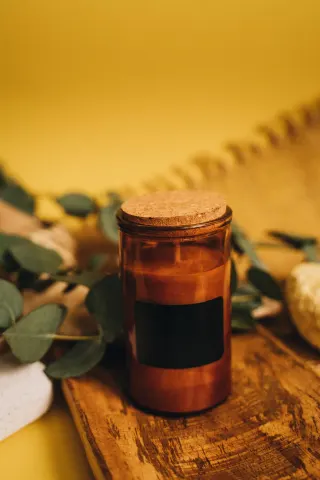
One product photo and a two-sentence brief were enough for Aisma, an AI video editor for existing footage, to replace the white candle in these cupped hands with an amber glass jar with a cork lid. Her grip, her apron and the room behind her stayed as filmed. The exact brief and the photo it used are below.
Paid editing · MP4 or MOV · 2–60 seconds · Review credits before generating.
White candle to amber jar.
Before → After sets the edit against the original; Full Aisma edit plays the whole clip.
Example requestswap the candle for the amber jar in the photo
What stays
What changes
What you bring
An 8-second clip + one product photo + the brief below
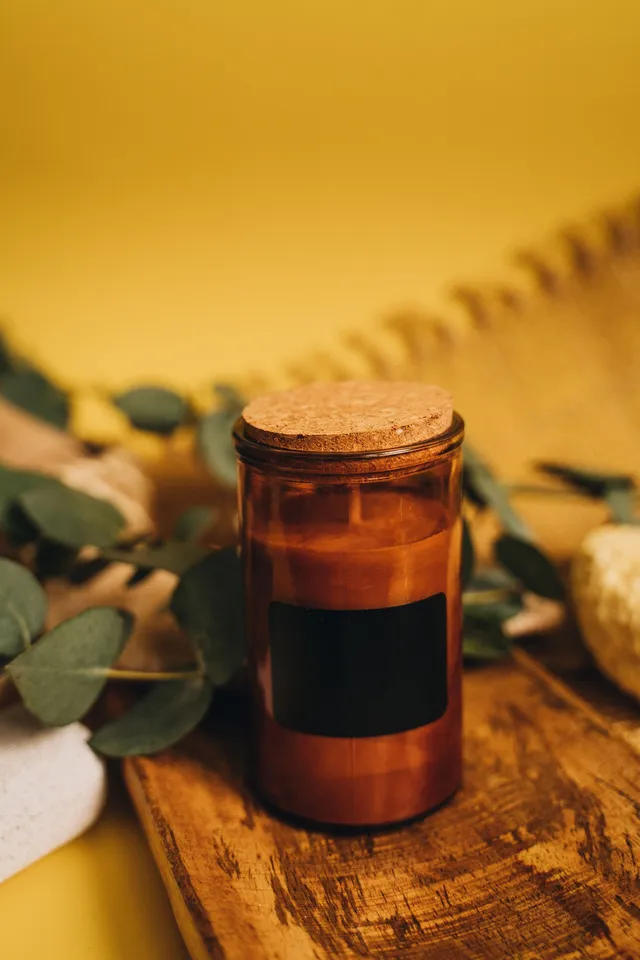
The short request under the player is how most people would say it. Below is the brief we actually sent, with the product photo it calls Photo 1.
It names the new product by what you can see in the photo, amber glass, a cork lid and a plain black label, and points to the photo by number. The second sentence keeps her hands, her grip, the apron, the room and the light, which is everything a product shot like this needs to hold still.
We sent it once at 720p and kept the result. The amber jar is taller than the white one, as it is in the photo, so it rises higher above her fingers while her hands hold it the same way.
Try it on your videoThe brief we sent, word for word
Replace the candle in her hands with the amber glass candle with a cork lid and a plain black label shown in Photo 1. Keep her hands, her grip, the apron, the room and the lighting.
8 seconds · 720p · one product photo · sent once
Up close
The jar
Amber glass, a cork lid and a plain black label, as in Photo 1. Through the glass you can see the candle inside and its wick.
The grip
Her cupped hands hold the new jar the way they held the old one, with the same fingers resting against the glass.
The size
The amber jar is taller than the white one, so more of it rises above her hands. The brief didn’t ask for the old jar’s size, and Aisma took the product’s shape from the photo.
For a product swap of your own, use a photo that shows the whole product clearly, ideally from an angle close to the one in your clip. Photo 1 here is a styled shot with leaves around the jar, and the edit took only the jar.
Make it yours
Ideas for makers and sellers, not results shown on this page. Swap in your own product, its photo and your keep list.
Soap maker
Replace the bar of soap in my hands with the wrapped soap in Photo 1. Keep my hands and the towel.
Coffee roaster
Swap the coffee bag on the counter for the bag in Photo 1. Keep the grinder and my hands.
Skincare launch
Replace the jar of cream in her palm with the jar in Photo 1. Keep her nails and the bathroom light.
Holiday gift guide
Swap the mug she holds for the red holiday mug in Photo 1. Keep her sweater and the tree behind her.
Pottery studio
Replace the bowl in his hands with the speckled bowl in Photo 1. Keep his apron and the wheel.
Craft fair booth
Swap the jar on the table for the honey jar in Photo 1, label included. Keep the tablecloth and the people.
Show products you own or have the rights to use. If a label has printed text, read it in the result before the clip goes into an ad.
HOW IT WORKS
MP4 or MOV, 2–60 seconds, up to 500 MB. Your original framing is kept.
Call it Photo 1 in the request, and list what has to stay.
Pick 720p or 1080p. Aisma shows the credits first, and the finished edit arrives in your private Library.
A FEW GOOD QUESTIONS
Yes, on the first try: this is the edit Aisma returned for the brief and Photo 1 above. Original video and Full Aisma edit play both complete files. The clip and the product photo are stock from Pexels.
No, though it helps. Photo 1 here shows the jar on a wooden board with leaves around it, and the edit took only the jar. Use a photo where the whole product is sharp and nothing covers it, and say which item in the photo is the product if there’s any doubt.
It takes its shape from the photo. The amber jar is taller than the candle she held, so it rises higher above her hands. If the size has to match the original, say so in the request, such as “the same height as the original jar.”
Read them before you post. This label is plain black, which leaves nothing to check, but printed text and fine logo details can come out slightly different from the photo, so look closely before the clip goes into an ad.
This clip is just under 8 seconds, and Aisma counts each shot in whole seconds, so it bills as 8: 80 credits at 720p, the quality we used, or 160 at 1080p. The Generate button shows the total before anything renders, and a part that fails costs nothing. Credit packs and plans are on the pricing page.
Yes. Give each product its own photo and say which photo replaces what, such as “the jar in Photo 1 replaces the candle, and the box in Photo 2 replaces the gift box.” For the steadiest result, keep that request to the swaps and leave other changes for a second edit.
Updated
More examples
YOUR NEXT EDIT STARTS HERE
Paid editing · MP4 or MOV · 2–60 seconds · Review credits before generating.