 aisma
aisma
Real Aisma edit
Clear glass to matte black.
Before → After sets the edit against the original; Full Aisma edit plays the whole 10 seconds.
Example requestswap the bottle for the black one from the photo
One product photo and a three-sentence brief were enough for Aisma, an AI video editor for existing footage, to replace the clear perfume bottle in this hand with a matte-black one. The grip and the quarter turn stayed, and so did the table by the bed. The exact brief and the photo it used are below.
Paid editing · MP4 or MOV · 2–60 seconds · Review credits before generating.
Clear glass to matte black.
Before → After sets the edit against the original; Full Aisma edit plays the whole 10 seconds.
Example requestswap the bottle for the black one from the photo
What stays
What changes
What you bring
A 10-second clip + one product photo + the brief below
The short request under the player says it in everyday words. Below is the brief we actually sent, with the product photo it calls Photo 1.
Two phrases matter most for product shots. “Keeping the same grip” holds the fingers where they were, and the last sentence asks for reflections and finger contact that fit the new bottle. Keep both when you swap in your own product.
One run, no retries: what you see is the first result. The black bottle is taller than the clear one, so it reaches lower in the palm, and the fingers still wrap around it the same way.
Try it on your videoThe brief we sent, word for word
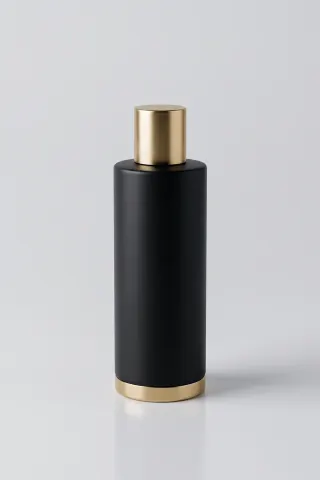
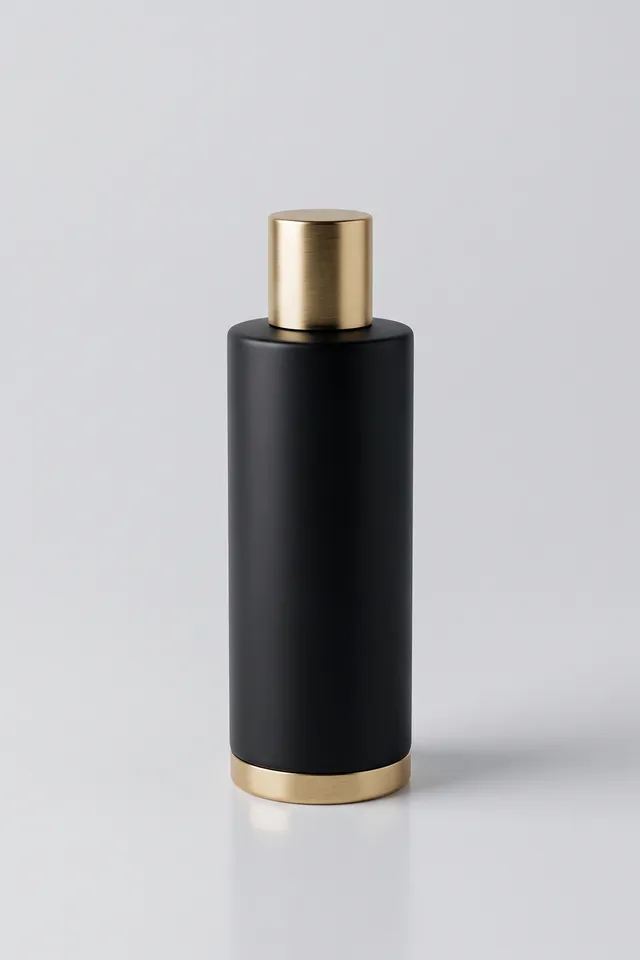
Replace the perfume bottle in the hand with the tall matte-black bottle shown in Photo 1, keeping the same grip. Preserve the hand, its movement, the table, background and lighting. Match the new bottle's reflections and finger contact naturally.
10 seconds · 720p · one product photo · sent once
Up close
The turn
Around six seconds the hand turns the bottle side-on. A cylinder looks the same from every side, so you see the turn in the hand and in the light on the bottle rather than in its outline.
The trim
The brushed gold cap and the gold ring at the base match Photo 1, and both stay put through the turn.
The room
The plant and the framed print behind the hand look the same as in the original, and the framing doesn’t change.
On a product with a printed label, read the label in the result before it goes into an ad, since small text can come out different from the photo. A clean product shot on a light background, like Photo 1, gives Aisma a clear view of the shape.
Make it yours
Ideas for sellers and small brands, not results shown here. Swap in your own product and keep list.
Shopify skincare clip
Swap the serum bottle in my hand for the bottle in Photo 1, keeping the same grip. Keep my hand and the bathroom counter.
Etsy candle shop
Replace the candle on the shelf with the amber jar candle in Photo 1. Keep the flame and the window light.
Coffee cart reel
Change the paper cup in her hand to the cup in Photo 1. Keep her hand and the street behind her.
Sneaker resale
Swap my sneakers for the pair in Photo 1. Keep my steps and the hardwood floor.
Holiday gift ad
Replace the gift box on the table with the box in Photo 1, red ribbon included. Keep the table and the hands around it.
New color, no photo
Make the bottle matte white with a silver cap. Keep my hand and the table.
Show products you own or have the rights to use. If the product appears in several shots, one request covers the whole clip.
HOW IT WORKS
MP4 or MOV, 2–60 seconds, up to 500 MB. Your original framing is kept.
Call it Photo 1 in one line, and say what has to stay.
Pick 720p or 1080p. Aisma shows the credits first, and the finished edit arrives in your private Library.
A FEW GOOD QUESTIONS
Yes, on the first try: this is the edit Aisma returned for the brief and Photo 1 above. Original video and Full Aisma edit play both complete files. The scene was created for this demonstration, and the black bottle is a made-up product without a brand.
The whole product, sharp and upright on a plain light background, with nothing in front of it. Photo 1 here shows the bottle from the front with its cap and base in view. If your clip shows the product from an angle, a photo from a similar angle helps.
Read them before you post. Printed text and fine logo details can come out slightly different from the photo, so check them in the result before the clip goes into an ad. This bottle has no print, which leaves less to check.
They shouldn’t, and here they didn’t. The brief lists the hand, its movement, the table, the background and the lighting as things to keep, and the edit holds all of them. If the product shows up in a reflection in your clip, say whether the reflection should change too.
A 10-second shot like this one comes to 80 credits at 720p or 160 at 1080p, at 8 and 16 credits per second. The Generate button shows the total before anything renders, and a part that fails costs nothing. Credit packs and plans are on the pricing page.
Yes. Aisma applies your request across every shot in the clip, up to 60 seconds. Each shot is priced in whole seconds, so a fast-cut ad costs a little more than its running time suggests.
Updated
More examples
YOUR NEXT EDIT STARTS HERE
Paid editing · MP4 or MOV · 2–60 seconds · Review credits before generating.