 aisma

Real Aisma edit
One dance, a new suit.
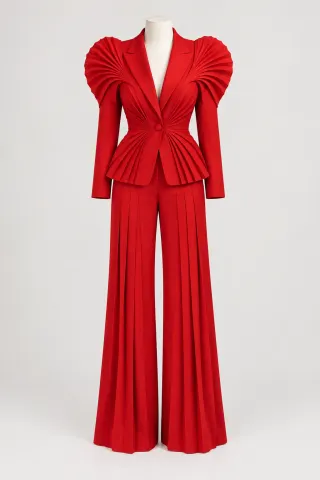
A real Aisma edit: her tracksuit changed to the scarlet suit in one photo, across the whole dance. Her face and her moves stay as filmed.
Example requestchange her tracksuit to this sculptural scarlet suit
As of November 20, 2026, here are seven AI tools that change clothes in a video, set out by what each one changes, whether it takes a photo of the garment, how long a clip it takes and where it runs. Aisma, which we make, dresses the person in your clip from a photo or a sentence and keeps their face, movement and audio.
Paid editing · MP4 or MOV · 2–60 seconds · Review credits before generating.
Updated November 20, 2026
One dance, a new suit.
A real Aisma edit: her tracksuit changed to the scarlet suit in one photo, across the whole dance. Her face and her moves stay as filmed.
Example requestchange her tracksuit to this sculptural scarlet suit
AS OF NOVEMBER 20, 2026
We make Aisma, so read its entry as the maker’s own. Every other entry is described from that company’s own public pages, as we read them on November 20, 2026.
Every tool here changes what a person wears in a video. They differ in whether they work from a garment photo or words, how long a clip they take and what else they can change.
| Tool | What it changes | Garment photo | Longest clip stated | Output | Where it runs |
|---|---|---|---|---|---|
| Aisma | A garment or a whole outfit, on one person or several | Optional, up to 10 photos; words work too | 2–60 seconds | 720p or 1080p | Web, iOS, Android |
| Runway · Edit Studio | One element you name, clothing among them, or the background, light or whole look | An edited frame as the target | Up to 30 seconds | 1080p | Web, API |
| Kling AI · video editing | Subjects and scene elements from a prompt and references | Yes, up to 10 images | 3–30 seconds a clip, 30 combined | 1080p; 4K listed as coming soon | Web, API |
| Pika · Swap Anything | Clothing, characters, backgrounds or props | Yes, references | Shown in the app | Not stated | Web |
| Vidguru · AI Video Clothes Changer | The clothing of one person; identity, pose and background stay | Yes, one garment image | 2–15 seconds, up to 50 MB | 480p or 720p | Web, iOS |
| Loova · AI Clothes Changer | A single garment or a full outfit | Yes, a clothing image | 3–10 seconds, up to 200 MB | Not stated | Web |
| The New Black · Edit Outfit in Video | Only the clothing, from one sentence | Words, not a photo | Not stated; the clip keeps its length | Not stated | Web |
“Not stated” means we didn’t find it on the company’s pages, not that the tool lacks it. These products change often, so check each company’s page before you decide.
TOOL BY TOOL
Best for: Changing clothes in a clip you already shot, from a garment photo or a sentence.
Upload a clip, add a photo of the garment when a specific piece matters and write the change, like “change her tracksuit to the suit in Photo 1.” The new outfit carries through the whole clip, and the face, movement, framing and original audio stay. Two people can get different outfits in one request.
See the AI video clothes changer and the guide to changing clothes in a video.
Best for: Multi-shot clips where one clothing change should carry across cuts.
Runway’s Edit Studio changes a single element you describe, such as a piece of clothing, a hairstyle or a product color, and can apply the edit across the relevant shots. You can give it a frame with the edit already made and preview the change as an image before you generate.
From its own pages: Edit Studio page and launch post.
Best for: Outfit edits steered by several reference images.
Kling AI’s video editor adds, removes and replaces subjects and scene elements from prompts and visual references, with up to 10 image references, and its user guide walks through replacing a character’s outfit. It takes up to five clips in one editing task.
From its own pages: AI video editor page, editing guide and user guide.
Best for: Changing the wardrobe along with the cast, the setting or the props.
Pika’s Swap Anything changes characters, clothing, backgrounds or props in your clip from references and a description of what should change, and keeps the performance as filmed. Pika shows each app’s file and length limits inside the app.
From its own pages: Swap Anything page and FAQ.
Best for: One-garment swaps on short single-person clips, with no prompt to write.
Vidguru’s AI Video Clothes Changer replaces what a person wears in an existing video with the garment in one image, such as a shirt, jacket, dress, trousers or skirt, and needs no text prompt. It works best with one clearly visible person in the frame.
From its own pages: clothes changer page.
Best for: Clothing swaps on very short clips, with video and photos in one tool.
Loova’s AI Clothes Changer swaps an existing shirt, jacket, dress or full outfit for the one in your clothing image, with separate tabs for video and photos. It takes MP4 or MOV clips of 3 to 10 seconds.
From its own pages: clothes changer page.
Best for: Fashion teams testing colorways and garment edits by text.
The New Black’s Edit Outfit in Video changes only the clothing in a clip from one sentence, including a colorway that doesn’t exist yet as a sample, and the clip keeps its length and its sound. Its guide suggests one change per run.
From its own pages: Edit Outfit in Video page and guide.
IF AISMA FITS
MP4 or MOV, 2–60 seconds, up to 500 MB. Your original framing is kept.
In plain words. Add up to 10 photos when a specific look matters.
Pick 720p or 1080p. Aisma shows the credits first, and the finished edit arrives in your private Library.
A FEW GOOD QUESTIONS
For a clip you already shot, Aisma: it dresses the person in the garment from your photo, or one you describe, across a clip of 2–60 seconds and keeps their face, movement and audio. For a quick one-garment swap on a short clip, Vidguru and Loova work from a single clothing image, and The New Black suits fashion teams editing by text.
Aisma takes up to 10 photos and works from words too. Kling AI takes up to 10 reference images, Pika takes references, and Vidguru and Loova take one clothing image. The New Black’s video edit works from words, and Runway takes a frame you’ve already edited.
Aisma takes 2–60 seconds in one go. Runway and Kling AI state 30 seconds, Vidguru 15 and Loova 10. Pika shows its limits in the app, and The New Black says the clip keeps its length.
In Aisma, yes: the face, the movement, the framing and your audio stay as filmed, and only the clothes change. Vidguru says identity, pose, background and camera follow the source clip, Pika keeps the performance as filmed, and The New Black changes only the clothing.
Yes. Aisma works from a description like “change his jacket to a navy denim jacket,” and a photo helps when a specific piece matters. The New Black works from words, and Runway from a description or an edited frame.
In Aisma, yes: your original audio comes back with the edit. The New Black says its clip keeps its sound. The other pages don’t say, so check with a clip that has music or speech.
Aisma has apps for iPhone, iPad and Android and runs in a phone browser too, with the same account and Library. Vidguru links an App Store app from its page.
YOUR NEXT EDIT STARTS HERE
Paid editing · MP4 or MOV · 2–60 seconds · Review credits before generating.