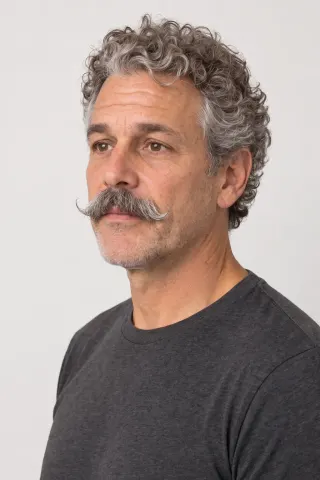
One performance, three new faces.
Real Aisma edits: one 10-second take, recast three times from two photos of each new person. The gestures, the framing and the sound stay as filmed.
Example requestreplace the man with the guy from the photos


As of November 20, 2026, here are seven video face swap tools, set out by what each one changes, whether it takes your photo, how long a clip it takes and where it runs. Aisma, which we make, swaps a face in a clip you already shot and keeps your framing and audio.
Paid editing · MP4 or MOV · 2–60 seconds · Review credits before generating.
Updated November 20, 2026

One performance, three new faces.
Real Aisma edits: one 10-second take, recast three times from two photos of each new person. The gestures, the framing and the sound stay as filmed.
Example requestreplace the man with the guy from the photos


AS OF NOVEMBER 20, 2026
We make Aisma, so read its entry as the maker’s own. Every other entry is described from that company’s own public pages, as we read them on November 20, 2026.
Every tool here puts a face from a photo into a video. They differ in how many faces they handle, how long a clip they take and where they run.
| Tool | What it changes | Reference photo | Longest clip stated | Output | Where it runs |
|---|---|---|---|---|---|
| Aisma | The face and hair from your photos, or the whole person | Yes, up to 10 photos | 2–60 seconds | 720p or 1080p | Web, iOS, Android |
| Magic Hour | One face; several with its multiple face swap tool | Yes, one photo per face | 10 seconds on the entry tier; longer on paid plans | 480p to 1080p by plan; 4K on top plans | Web, API |
| Akool | The face in every frame, a different one per person if you like | Yes, one per person | From 30 seconds to 15 minutes, by plan | Up to 4K, depending on the source | Web, API |
| VisionStory | The face only, or the full look with hair and clothes | Yes, one image | 4–180 seconds, up to 200 MB | 720p or 1080p | Web |
| Facy | One or several faces, each mapped to its own photo | Yes, one or more | Up to 60 minutes | Not stated | Web, Android |
| EasyFaceSwap | One face or several, in the seconds you pick | Yes, one face photo | Up to 60 seconds a clip | HD | Web, in desktop and phone browsers |
| Higgsfield | One face per run; the rest of the character stays | Yes, one photo | Not stated | Not stated | Web; Photoshop and Figma plugins |
“Not stated” means we didn’t find it on the company’s pages, not that the tool lacks it. These products change often, so check each company’s page before you decide.
TOOL BY TOOL
Best for: Swapping a face in a clip you already shot, with your framing and audio kept.
Upload a clip of 2–60 seconds, add two clear photos of the new person, yourself or someone who agreed to it, and write one line saying who they replace. The face and hair come from the photos, while the gestures, setting, camera move and original audio stay as filmed. Ask for the whole person and their clothes change too.
See the video face swap page and the guide to face swapping a video.
Best for: Quick swaps on short clips and GIFs, with an API for developers.
Magic Hour’s video face swap replaces the face in a clip with the one in your photo, works on GIFs as well as video and runs in the browser. A separate multiple face swap tool maps each face in a group clip to its own photo.
From its own pages: face swap page and multiple face swap page.
Best for: Longer business videos with several people to swap.
Akool’s video face swap replaces a face across every frame and can give each person in a group shot their own replacement, carrying over expressions, head movement and lip position. You can queue several videos at once.
From its own pages: video face swap page and face swap app page.
Best for: Clips up to three minutes where the new person’s hair and outfit should come along.
VisionStory’s video face swap has two modes: one replaces the face and keeps the body, outfit and performance, and the full-body mode brings in the reference person’s face, hairstyle and clothing. Its page says both modes keep the original audio.
From its own pages: face swap page and tutorial.
Best for: Long videos with several faces to map.
Facy’s AI video face swap replaces one or several faces with the faces in your photos, or applies one face to everyone it detects, with no keyframes or rotoscoping. It accepts MP4, AVI, MOV, MKV and WEBM, and its site lists videos of up to 60 minutes.
From its own pages: video face swap page and home page.
Best for: Swapping a face in just the seconds that matter, from a browser.
EasyFaceSwap replaces a face in a video with the one in your photo, in single-face or multiple-face mode, and lets you pick the exact seconds to swap. It runs in a desktop or phone browser with nothing to install, and takes M4V, MP4, MOV and WEBM.
From its own pages: video face swap page.
Best for: Putting your own face into a single-subject clip.
Higgsfield’s video face swap puts the face from your photo into a clip without replacing the whole character, one face per generation, and tracks the face to keep the likeness as expressions and camera angles change. It runs in desktop and phone browsers and through Higgsfield’s plugins.
From its own pages: face swap page.
IF AISMA FITS
MP4 or MOV, 2–60 seconds, up to 500 MB. Your original framing is kept.
In plain words. Add up to 10 photos when a specific look matters.
Pick 720p or 1080p. Aisma shows the credits first, and the finished edit arrives in your private Library.
A FEW GOOD QUESTIONS
For a clip you already shot, Aisma: it swaps the face from your photos in a clip of 2–60 seconds and keeps your framing, gestures and audio. For long videos with many faces, Facy and Akool state the longest limits, and VisionStory’s full-body mode also brings over the new person’s hair and clothes.
All seven. Aisma takes up to 10 photos, and two clear portraits are enough. Facy takes one or more, Magic Hour and Akool one per face, and VisionStory, EasyFaceSwap and Higgsfield one each.
Aisma takes 2–60 seconds in one go, up to 500 MB. Facy lists videos of up to 60 minutes, Akool up to 15 minutes depending on the plan, VisionStory up to 180 seconds and EasyFaceSwap 60 seconds a clip. Magic Hour states 10 seconds on its entry tier and longer clips on paid plans; Higgsfield doesn’t state a length.
In Aisma, yes: add photos for each person and say who goes where, like “replace the man on the left with Photos 1 and 2.” Facy, Akool and EasyFaceSwap also handle several faces, Magic Hour through its multiple face swap tool, and Higgsfield swaps one face per generation.
In Aisma, yes: the audio you recorded stays, so the new person speaks with the original voice. VisionStory’s page says both of its modes keep the original audio. The other pages don’t say, so try a clip with speech first.
Aisma has apps for iPhone, iPad and Android and runs in a phone browser too, with the same account and Library. Facy has an Android app, and EasyFaceSwap and Higgsfield run in phone browsers.
Your own, or that of someone who agreed to it. Aisma is for footage and photos you own or have permission to use, and swaps meant to fool people aren’t allowed.
YOUR NEXT EDIT STARTS HERE
Paid editing · MP4 or MOV · 2–60 seconds · Review credits before generating.