 aisma

Real Aisma edit · Previous version
One step. Two more sneakers.
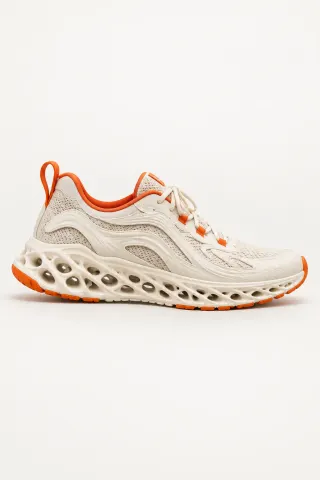
One 10-second take of a foot stepping down and pivoting, edited twice, each time from one photo of the shoe.
Example requestchange the sneaker to the one in the photo
AI VIDEO EDITING FOR AGENCIES
Aisma is an AI video editor for UGC studios and performance agencies that need the next version of a take the client already approved. Upload the clip, add a product photo or describe the change, and the same shot comes back with a new product, a new background or someone removed, its framing and sound as filmed.
Paid editing · MP4 or MOV · 2–60 seconds · Review credits before generating.
One step. Two more sneakers.
One 10-second take of a foot stepping down and pivoting, edited twice, each time from one photo of the shoe.
Example requestchange the sneaker to the one in the photo
THE SHORT ANSWER
It turns one approved take into the versions a campaign needs, without booking the shoot again. You upload a 2–60 second clip to Aisma, write one sentence about what changes, add a product photo when the new product matters, and download an MP4 of the same take: the same creator, timing and camera move, with the product, the background or the clutter changed.
What stays
What changes
What you bring
The approved take + one sentence (and a product photo)
TWO MORE CLIENT EDITS
A stranger walked out of a wedding clip, and a talking-head take moved from a gray wall to a home office, each from one written request and no photo.

Just the two of you.remove the guy in the red jacket behind them

A home office.change the gray wall behind him to a cozy home office
Examples marked Previous version were recorded with a previous version of Aisma.
THREE CLIENT JOBS
After sign-off, a client often comes back with a small change to a shot that already works: another product in the creator’s hand, a person or an object out of the frame, a different room behind the speaker. Each of those is one edit in Aisma, and each starts from the take you already have.
The sneaker at the top is one approved 10-second take of a foot stepping down and pivoting on the heel. Two edits made with a previous version of Aisma put a cream lattice sole and a black trail shoe on it, each from one photo of the shoe and a request as short as “change the sneaker to the one in the photo.”
| Job | What you send | The edit on this page |
|---|---|---|
| Swap the product | The take and one photo of the other product | The sneaker: “put the black trail shoe from the photo on him” |
| Remove an object or a person | The take and one sentence naming what goes | The wedding clip: “remove the guy in the red jacket behind them” |
| Change the background | The take and one sentence describing the new place | The talking head: “change the gray wall behind him to a cozy home office” |
Each job has its own page with more real edits: the AI product swap, object and person removal and the video background changer.
USE CASES
A UGC video editor that works on the picture rather than the timeline fits the jobs that used to mean a reshoot or a long session of masking. These are the ones a written request handles:
Every version keeps the length and timing of the take, so captions, music and end cards you add in your own editor line up across all of them.
HOW A STUDIO ORDERS
Each studio works in its own Aisma account, with its own uploads, Library and credits. Every edit shows its price in credits before you press Generate. Pricing: aisma.ai/pricing.
Sign in and the account’s Library and credits come with you to every device: the browser at aisma.ai, the app for iPhone and iPad (iOS 16.4 or later) and the Android app. A take shot on a creator’s phone can go straight in.
Running edits in volume? Write to support@aisma.ai with roughly how many clips a month, how long they are and where they will run, and we’ll get back to you.
Studios with their own pipeline can run the same edits from scripts through Aisma’s public API, on the same account and credits. The developers page has the details.
HOW IT WORKS
Want one edit followed from upload to result? Our guide on how to edit a video with AI walks through every step.
MP4 or MOV, 2–60 seconds, up to 500 MB. Vertical, square and horizontal all work.
Name what changes and what stays, as in “change the sneaker to the one in the photo.” Add one photo per product.
Pick 720p or 1080p, see the credits, generate, and save the MP4 from your Library.
CLIENT REQUESTS
Name the thing to change, then what must stay. Point to a photo when the new product matters. More on wording is in how to write a video edit prompt.
Skincare UGC for a new client
swap the serum bottle in her hand for the one in Photo 1, keep her nails and the label facing the camera
Sneaker ad, second colorway
change the sneaker to the one in the photo, keep the step, the pants and the floor
Talking-head ad for a holiday flight
change the white wall behind her to a living room with a decorated tree, keep her and the camera
Unboxing on a busy desk
remove the coffee mug and the phone charger from the desk
Street interview
remove the man in the gray hoodie walking behind them
Drink ad for another market
swap the can for the one in Photo 1; Photo 2 shows its back
WHAT YOU GET BACK
WHAT IT COSTS
A FEW GOOD QUESTIONS
Yes, when the studio owns the footage or the client has given permission to edit it, and the people in it agreed to be filmed for the ad. Our Terms of use ask the same of every account: you keep your rights in what you upload, and it has to be content you own or are allowed to use. The same goes for product photos.
Up to a full minute. Aisma takes clips of 2–60 seconds, up to 500 MB, as MP4 or MOV, which is longer than most AI video editors take in one go: in our AI video editor comparison, most of the other editors take 15 to 30 seconds in one job. A longer cut can go a minute at a time: each part keeps its length and framing, so the parts line up again in your editor. Our article on video length and formats has the details.
MP4 or MOV files, vertical, square or horizontal, in any shape from 9:32 tall to 32:9 wide. Product photos go in as JPEG, PNG or WebP files of 20 MB or less, up to 10 per edit.
Yes. A take filmed on an iPhone or an Android phone goes in as it is. Aisma runs in the browser at aisma.ai, in the app for iPhone and iPad (iOS 16.4 or later) and in the Android app. Sign in and your Library and credits come with you to every device.
An MP4 of the same take with the change in it, at the same length and framing as your clip and with its original sound. It comes in 720p by default, or in 1080p if you pick it before you generate, and it lands in your private Library, where Save video keeps the file on your device. Our article on what you download covers Share and redoing one clip.
Yes. The take, the product photos and every finished edit are private to the studio’s account: only you can open them in your Library, each through a short-lived link, and you can delete any finished task from its menu whenever you like. The examples on this page were made separately for public use.
It stays as recorded. Aisma keeps the original audio of the take, so the voiceover, the music and the room sound play under the new picture.
Yes. Aisma’s public REST API and its MCP server run the same edits from your own scripts or AI agents, on the same account and credits; create a key on the web under Profile → Settings & help → Connected apps and keys. The developers page has the details.
Yes. Both sneakers, the wedding clip and the home office are real Aisma edits of the takes shown with them, and Full Aisma edit plays every version whole. Examples marked Previous version were recorded with a previous version of Aisma. Before → After views show the original and the edit at the same moment of the clip, never cropped, sped up or retouched.
Updated
YOUR NEXT EDIT STARTS HERE
Paid editing · MP4 or MOV · 2–60 seconds · Review credits before generating.